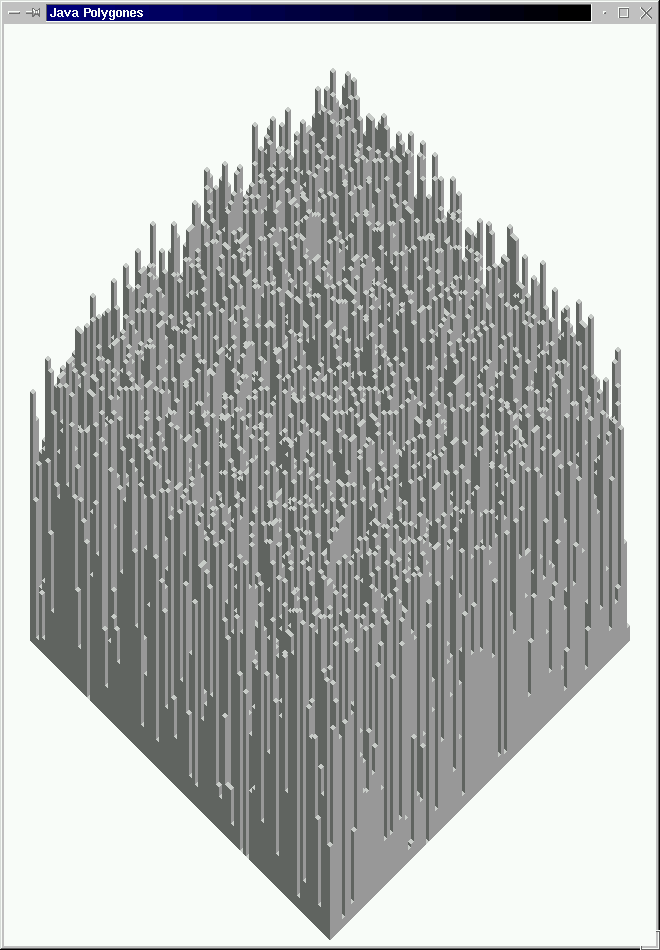
Figure 1 :Output from code presented in Table 1
|
Polygones are multiple shapes and can be produced using the methods drawPolygon
and fillPolygone. The arguments for either can be a two integer arrays of coordinates,
xCoords[] and yCoords[], or an instance of the class Polygon.
To create a
int xCoords[] = {20, 40, 50, 30};
int yCoords[] = {50, 50, 60, 80};
Polygon myPolygon = new Polygone(xCoords,yCoords);
drawPolygon(myPolygone);
Alternatively we could have wriitem:
int xCoords[] = {20, 40, 50, 30};
int yCoords[] = {50, 50, 60, 80};
drawPolygon(xCoords,yCoords);
to produce the same effect.
In this example we draw 10000 (100*100) 3-D cuboids, each of a random height, placed on a 100 by 100 grid. Each cuboid ismade up of three polgones, one for each "face".
// JAVA POLYGONES
// Frans Coenen
// Tuesday 22 May 2003
// The University of Liverpool, UK

/* Based on example given by Deitel and Deital */

import java.awt.*;
import java.awt.event.*;
import java.awt.geom.*;
import java.awt.image.*;

// Java extension packages
import javax.swing.*;

public class Polygones extends JFrame {

    // ------------------- FIELDS ------------------------

    /* CONSTANTS */

    static final int INDENT = 3;
    static final int MAX = 100;
    static final int Y_BORDER = 10;
    static final int X_BORDER = 30;
    static final int WIDTH = (X_BORDER*2)+(INDENT*MAX*2);
    static final int HEIGHT = 30+(Y_BORDER*2)+(INDENT*MAX*3);

    // ------------------ CONSTRUCTORS -------------------

    public Polygones() {
        super("Java Polygones");

        getContentPane().setBackground(Color.white);
        setSize(WIDTH,HEIGHT);
        setVisible(true);
        }

    // ------------------ METHODS ------------------------

    /* PAINT */

    /** Draws general paths. */

    public void paint(Graphics g) {
        // Call superclass paint method
        super.paint(g);

        int height, x2, y2;
        int x1 = (99*INDENT)+X_BORDER;
        int y1 = (102*INDENT)+Y_BORDER+30;
        for(int xIndex=MAX;xIndex>0;xIndex--) {
            x2 = x1;
            y2 = y1;
            for(int yIndex=MAX;yIndex>0;yIndex--) {
                height = (int) (Math.random()*100);
        	drawTower(g,x2,y2,height*INDENT);
        	x2 = x2-INDENT;
        	y2 = y2+INDENT;
        	}
            x1 = x1+INDENT;
            y1 = y1+INDENT;
            }
        }

    public void drawTower(Graphics g, int x, int y, int h) {
        drawPolygoneLeft(g,x,y,h);
        drawPolygoneRight(g,x,y,h);
        drawDiamond(g,x,y,h);
        }

    public void drawPolygoneLeft(Graphics g, int x, int y, int h) {

        g.setColor(new Color(102,102,102));

        int xValues[] = {x,x,x+INDENT,x+INDENT};
        int yValues[] = {y-INDENT,y-INDENT-h,y-h,y};

        Polygon polygon1 = new Polygon(xValues,yValues,4);

        g.fillPolygon(polygon1);
        }

     public void drawPolygoneRight(Graphics g, int x, int y, int h) {
        g.setColor(new Color(153,153,153));

        int xValues[] = {x+INDENT,x+INDENT,x+INDENT+INDENT,x+INDENT+INDENT};
        int yValues[] = {y,y-h,y-h-INDENT,y-INDENT};

        Polygon polygon1 = new Polygon(xValues,yValues,4);

        g.fillPolygon(polygon1);
        }

     public void drawDiamond(Graphics g, int x, int y, int h) {
        g.setColor(new Color(204,204,204));

        int xValues[] = {x,x+INDENT,x+INDENT+INDENT,x+INDENT};
        int yValues[] = {y-h-INDENT,y-h-INDENT-INDENT,y-h-INDENT,y-h};

        Polygon polygon1 = new Polygon(xValues,yValues,4);

        g.fillPolygon(polygon1);
        }

    /* MAIN METHOD */

    public static void main(String args[]) {
        Polygones application = new Polygones();

        application.setDefaultCloseOperation(JFrame.HIDE_ON_CLOSE);
        }
    }
|
Table 1: Polygone example code
Figure 1 :Output from code presented in Table 1