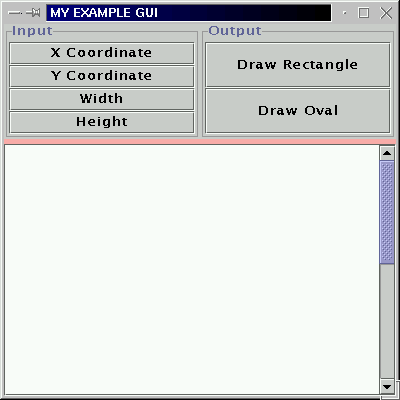
Figure 1: The MyExampleGUI window
|
Often we wish to produce a second window from within our GUIs. In this example I present a fairly generic GUI that can be used as a template to produce a second winow (on the click of a button) containinmg a drawing area. The example application allows the user to input X and Y coordinates and a width and height for a rectangle or an oval (as directed by the user) to be drawn in a second window.
The example comprises three classes:
// MY GUI DRAWING EXAMPLE
// Frans Coenen
// University of Liverpool
// 2 September 2003

import java.io.*;
import java.util.*;
import java.awt.*;
import java.awt.event.*;
import javax.swing.*;

// Other packages in here if any

public class MyGUI extends JFrame implements ActionListener{

    /* ------ FIELDS ------ */

    // Constants
    /** Minimum support value */
    private static final int MINIMUM = 1;
    /** Maximum support value */
    private static final int MAXIMUM = 200;

    // GUI features
    /** The text area to list results. */
    private JTextArea textArea;
    /** Input button for X coordinate input. */
    private JButton inputXcoordButton;
    /** Input button for Y coordinate input. */
    private JButton inputYcoordButton;
    /** Input button for width input. */
    private JButton inputWidthButton;
    /** Input button for height input. */
    private JButton inputHeightButton;
    /** Draw rectangle button. */
    private JButton drawRectangleButton;
    /** Draw Oval button. */
    private JButton drawOvalButton;
    /** Input panel */
    private JPanel inputPanel;
    /** Output panel */
    private JPanel outputPanel;

    // Other fields
    /** Rectanmgle width and height with defualt values. */
    private int width  = 10;
    private int height = 10;
    /** X and Y coordinates with default values. */
    private int xCoord = 10;
    private int yCoord = 10;

    /* ------ CONSTRUCTORS ------ */

    public MyGUI(String s) {
        super(s);

        // Create instance of AssocRuleMining

	// Content pane
        Container container = getContentPane();
        container.setBackground(Color.pink);
        container.setLayout(new BorderLayout(5,5)); // 5 pixel gaps

        // Create panels
	createInputButtonsPanel();
	createOutputButtonsPanel();

	// Button Panel
	JPanel buttonPanel = new JPanel();
	buttonPanel.setLayout(new GridLayout(1,2));
	buttonPanel.add(inputPanel);
	buttonPanel.add(outputPanel);
	container.add(buttonPanel,BorderLayout.NORTH);

	// Text area
	textArea = new JTextArea(40, 15);
	textArea.setEditable(false);
        container.add(new JScrollPane(textArea),BorderLayout.CENTER);
	}

    /* CREATE INPUT PANEL. */
    /** Creates the buttons for the input panel. */

    private void createInputButtonsPanel() {
	// Create panel
	inputPanel = new JPanel();
	inputPanel.setLayout(new GridLayout(4,1));
	inputPanel.setBorder(BorderFactory.createTitledBorder("Input"));

	// Add buttons
	inputXcoordButton = new JButton("X Coordinate");
	inputXcoordButton.addActionListener(this);
        inputYcoordButton = new JButton("Y Coordinate");
        inputYcoordButton.addActionListener(this);
	inputWidthButton = new JButton("Width");
	inputWidthButton.addActionListener(this);
	inputHeightButton = new JButton("Height");
	inputHeightButton.addActionListener(this);

	// Add to panel
	inputPanel.add(inputXcoordButton);
	inputPanel.add(inputYcoordButton);
	inputPanel.add(inputWidthButton);
	inputPanel.add(inputHeightButton);
	}

    /* CREATE OUTPUT PANEL */
    /** Creates the buttons for the output panel. */

    private void createOutputButtonsPanel() {
	outputPanel = new JPanel();
	outputPanel.setLayout(new GridLayout(2,1));
	outputPanel.setBorder(BorderFactory.createTitledBorder("Output"));

	// Add buttons
	drawRectangleButton = new JButton("Draw Rectangle");
	drawRectangleButton.addActionListener(this);
	drawOvalButton = new JButton("Draw Oval");
	drawOvalButton.addActionListener(this);

	// add to panel
	outputPanel.add(drawRectangleButton);
	outputPanel.add(drawOvalButton);
	}

    /* ACTION PERFORMED */

    public void actionPerformed(ActionEvent event) {
        // Input panel
        if (event.getActionCommand().equals("X Coordinate")) inputXcoordinate();
        if (event.getActionCommand().equals("Y Coordinate")) inputYcoordinate();
        if (event.getActionCommand().equals("Width")) inputWidth();
        if (event.getActionCommand().equals("Height")) inputHeight();

	// Output panel
	if (event.getActionCommand().equals("Draw Rectangle")) drawRectangle();
        if (event.getActionCommand().equals("Draw Oval")) drawOval();
	}

    /* ---------------------------------------------------------------- */
    /*                                                                  */
    /*                              INPUT                               */
    /*                                                                  */
    /* ---------------------------------------------------------------- */

    /* INPUT X COORDINATE */
    private void inputXcoordinate() {
        int value = getInputValue("X coordinate","X COORDINATE");
        if (value >= MINIMUM) {
            xCoord = value;
            textArea.append("X coordinate = " + xCoord + "\n");
            }
        textArea.append("\n");
        }

    /* INPUT Y COORDINATE */
    private void inputYcoordinate() {
        int value = getInputValue("Y coordinate","Y COORDINATE");
        if (value >= MINIMUM) {
            yCoord = value;
            textArea.append("Y coordinate = " + yCoord + "\n");
            }
        textArea.append("\n");
        }

    /* INPUT WIDTH */
    private void inputWidth() {
        int value = getInputValue("Width","WIDTH");
        if (value >= MINIMUM) {
            width = value;
            textArea.append("Width = " + width + "\n");
            }
        textArea.append("\n");
        }

    /* INPUT HEIGHT */
    private void inputHeight() {
        int value = getInputValue("Height","HEIGHT");
        if (value >= MINIMUM) {
            height = value;
            textArea.append("Height = " + height + "\n");
            }
        textArea.append("\n");
        }

    /* GET INPUT VALUE */
    private int getInputValue(String label1, String label2) {
        int value;

        textArea.append("INPUT " + label2 + "\n---------------------\n");

        // Try-catch block
        try{
           while (true) {
               String stNum1 = JOptionPane.showInputDialog("Input " + label1 +
	       		". Integer value between " + MINIMUM + " and " + MAXIMUM);
	       value = Integer.parseInt(stNum1);
               if (value>=MINIMUM && value <= MAXIMUM) return(value);
               JOptionPane.showMessageDialog(null,
	       		label2 + " VALUE INPUT ERROR:\n" +
	       		"input = " + value +
	       		"\nsupport threshold input must be an integer " +
			"or a floating point number between " + MINIMUM +
			" and " +  MAXIMUM);
	       }
	    }
        catch(NumberFormatException e) {
	    }

	// Default returm
	return(-99);
	}

    /* ---------------------------------------------------------------- */
    /*                                                                  */
    /*                             OUTPUT                               */
    /*                                                                  */
    /* ---------------------------------------------------------------- */

    /* DRAW RECTANGLE */
    /** Commences processes of drawing a rectangle to the screen in a
    separate window. */
    private void drawRectangle() {
	textArea.append("Draw Rectangle\n---------------------\n");

	MyWindow newWindow = new
	    		    MyWindow("Rectangle",xCoord,yCoord,width,height);
        newWindow.setDefaultCloseOperation(JFrame.HIDE_ON_CLOSE);
	textArea.append("Done\n\n");
	}

    /* DRAW OVAL */
    /** Commences processes of drawing a oval to the screen in a
    separate window. */
    private void drawOval() {
	textArea.append("Draw Oval\n---------------------\n");

	MyWindow newWindow = new
	    		    MyWindow("Oval",xCoord,yCoord,width,height);
        newWindow.setDefaultCloseOperation(JFrame.HIDE_ON_CLOSE);
	textArea.append("Done\n\n");
	}

    /* ------------------------------------------------------- */
    /*                                                         */
    /*                         MAIN METHOD                     */
    /*                                                         */
    /* ------------------------------------------------------- */

    /* MAIN METHOD */

    public static void main(String[] args) throws IOException {

	// Create instance of class AprioriTgui
	MyGUI newGUI = new MyGUI("MY EXAMPLE GUI");

	// Make window vissible
	newGUI.setDefaultCloseOperation(JFrame.HIDE_ON_CLOSE);
	newGUI.setSize(400,400);
        newGUI.setVisible(true);
        }
    }
|
Table 1: The MyGUI classM
// MY WINDOW EXAMPLE CLASS
// Frans Coenen
// MOnday 30 June 2003
// The University of Liverpool, UK

import java.awt.*;
import java.awt.geom.*;

// Java extension packages
import javax.swing.*;

// Other packages in here if any

public class MyWindow extends JFrame {

    // ------------------- FIELDS ------------------------

    /* CONSTANTS */

    static final int CANVAS_WIDTH  = 400;
    static final int CANVAS_HEIGHT = 400;

    // ------------------ CONSTRUCTORS -------------------

    public MyWindow(String type, int x, int y, int w, int h) {
        super("My Window");

	// Create drawing area
	MyCanvas canvas = new MyCanvas(type,x,y,w,h);
	canvas.setBackground(Color.white);
	canvas.setPreferredSize(new Dimension(CANVAS_WIDTH,CANVAS_HEIGHT));

	// Create scroll pane
        JScrollPane sp1 = new JScrollPane(canvas);

	// Get container and add scroll pane
        Container container = getContentPane();
        container.setBackground(Color.pink);

	container.add(sp1);
        setSize(300,300);
        setVisible(true);
        }

    // ------------------ METHODS ------------------------

    /* Include any additional methods that might need to be called
    from the constructor in here. */
    }
|
Table 2: The NyWindow classM
// MY CANVAS DRAWING EXAMPLE
// Frans Coenen
// University of Liverpool
// 27 June 2003

import java.awt.*;

// Java extension packages
import javax.swing.*;

// Other packages if any

public class MyCanvas extends JPanel {

    /* FIELDS */

    private int xCoord, yCoord, width, height;
    private String type;

    /* CONSTRUCTOR */

    public MyCanvas(String t, int x, int y, int w, int h) {
        super();

        // Set fields
        type   = t;
        xCoord = x;
        yCoord = y;
        width  = w;
        height = h;
	}

    /* METHODS. Top level method sgould overwrite paiontComponent
    method in Java Swing API but can include calls to any other
    methods as desired. */

    public void paintComponent(Graphics g) {

        // Make the panel opaque
        super.paintComponent(g);

        // draw

	g.setColor(Color.pink);
        if (type.equals("Rectangle")) {
	    g.fillRect(xCoord,yCoord,width,height);
	    g.setColor(Color.red);
	    g.drawRect(xCoord,yCoord,width,height);
	    }
        else if (type.equals("Oval")) {
	    g.fillOval(xCoord,yCoord,width,height);
	    g.setColor(Color.red);
	    g.drawOval(xCoord,yCoord,width,height);
	    }
        }
    }
|
Table 3: The MyCanvas classM
Figure 1 shows the top level GUI and Figure 2 some eaxmple output (an oval ibn this case).
Figure 1: The MyExampleGUI window
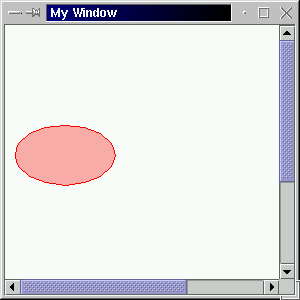
Figure 2: Example output (oval)