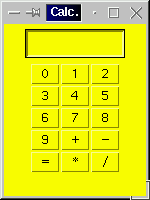
Figure 1: Result of exacuting code presented in Table 1.
|
| 1. Simple calculator | |
| 2. Colour Chooser (Swing example) |
Design and develop a simple calculator Java program on the lines illustrated on COMP101 but using a GUI instead of a command line interface.
Bote: do soultion presented is founded on a similar example presented in Holmes 1998.
Two callses a Calculator class and an application class (CalculatorApp).
1. Calculator constructor to create an instance of the class Calculator. Includes a window listener to close the wondow with. A panel in which the various keyboard button are contained and a set of buttons. The buttons are set up using a field (keys) compriseing an array of strings with each strinf representing the label for the button. The buttons are set up using a for loop.
2. A set of window event handlers.
3. actionPerformed method invoked when a keypad button is pressed. Includes calls to testForDigit, testForOperator and doCalculation.
4. testForDigit and testForOperator.
5. doCalculation. Includes try-catch to handle divide by zero error.
1. main
The code to implement the above is given in Table 1.
// CALCULATOR EXAMPLE PROGRAM
// Frans Coenen
// Friday 1st September 2000
// Dept. of Comp. Sci., University of Liverpool

import java.awt.event.*;
import java.awt.*;

class Calculator extends Frame implements ActionListener, WindowListener {

    // ----------------------- FIELDS --------------------------

    private TextField display = new TextField(10);
    private Button[] button = new Button[15];

    static String[] keys = {" 0 "," 1 "," 2 "," 3 "," 4 "," 5 "," 6 ",
    		" 7 "," 8 "," 9 "," + "," - "," = "," * "," / "};

    private StringBuffer registerA = new StringBuffer();
    private StringBuffer registerB = new StringBuffer();

    private char operator;
    private boolean firstNumberAlreadyInput = false;

    // --------------------- CONSTRUCTORS ----------------------

    public Calculator(String text) {
        super(text);
        setBackground(Color.yellow);
        addWindowListener(this);

        // Set up display

        setLayout(new FlowLayout(FlowLayout.CENTER));
	add(display);
	Panel keypad = new Panel();
	keypad.setLayout(new GridLayout(5,3));

	// Set up Keypad

	for (int index=0;index!=15;index++) {
	    button[index] = new Button(keys[index]);
	    button[index].addActionListener(this);
	    keypad.add(button[index]);
	    }
	add(keypad);
	}

    // ---------------------- ACTION LISTENERS -------------------

    /* Window Closed */

    public void windowClosed(WindowEvent event) {
        }

    /* Window Deiconified */

    public void windowDeiconified(WindowEvent event) {
        }

    /* Window  Iconified */

    public void windowIconified(WindowEvent event) {
        }

    /* Window Activated */

    public void windowActivated(WindowEvent event) {
        }

    /* Window Deactivated */

    public void windowDeactivated(WindowEvent event) {
        }

    /* Window Opened */

    public void windowOpened(WindowEvent event) {
        }

    /* Window Closing */

    public void windowClosing(WindowEvent event) {
        System.exit(0);
        }

    /* Action Performed: Method to detect which key has been pressed */

    public void actionPerformed(ActionEvent event) {
        final int positionOfEqualsKey = 12;
        Object source = event.getActionCommand();

        if (testForDigit(source)) return;
	else {
	    if (testForOperator(source)) return;
	    else {
	        display.setText(doCalculation());
		registerA.setLength(0);
		registerB.setLength(0);
		firstNumberAlreadyInput = false;
		}
            }
	}

    // ---------------------- METHODS -----------------------------

    /* Test for digit: test for digit in the range 0-9 */

    private boolean testForDigit(Object source) {

	for (int digit=0;digit<10;digit++) {
	    if (source.equals(keys[digit])) { 	// Found digit
	        if (firstNumberAlreadyInput) {
		    registerB.append(String.valueOf(digit));
		    display.setText(registerB.toString());
		    }
		else {
		    registerA.append(String.valueOf(digit));
		    display.setText(registerA.toString());
		    }
		return(true);
		}
	    }

	return(false);
	}

    /* Test for operator: */

    private boolean testForOperator(Object source) {
        for (int digit=10;digit<15;digit++) {
	    if (source.equals(keys[digit]) && (digit != 12)) {
	        operator = keys[digit].charAt(1);
	        firstNumberAlreadyInput = true;
		return(true);
		}
	    }

	return(false);
	}

    /* Do calculation: Includes divide by zero error test. */

    private String doCalculation() {
        final char beep = '\u0007';

	try {
	    int numA = new Integer(registerA.toString()).intValue();
	    int numB = new Integer(registerB.toString()).intValue();

	    switch(operator) {
	        case '+':
		    return String.valueOf(numA+numB);
		case '-':
		    return String.valueOf(numA-numB);
		case '*':
		    return String.valueOf(numA*numB);
		default:
		    return String.valueOf(numA/numB);
		}
	    }
	catch (ArithmeticException error) {
	    System.out.print(beep);
	    return "   E R R O R";
	    }
	}
    }

/* --------------------------------------------------------------- */
/*                                                                 */
/*                          CALCULATOR APP                         */
/*                                                                 */
/* --------------------------------------------------------------- */

class CalculatorApp {

    /* Main  method */

    public static void main(String[] args) {
        Calculator screen = new Calculator("Calc.");

        screen.setSize(150,200);
        screen.setVisible(true);
        }
    }
|
Table 1:Calculator program
The resulting GUI is shown in Figure 1.
Figure 1: Result of exacuting code presented in Table 1.
The example (based on an Applet in Morelli 2003) in Table 2 and 3 combines a canvas with some other features and includes elements from the BorderFactory class. Note that we first create our own isntance of the Canvas class (Table 3).
// COLOUR CHOOSER
// FRANS COENEN
// TUESDAY 1 July 2003
// THE UNIVERSITY OF LIVERPOOL

/* Based on a similar example by R.Morelli (2003), "Java, Java, Java",
2nd Edition, Prentice Hall. */

import javax.swing.*;
import java.awt.*;
import java.awt.event.*;

public class ColourChooser extends JFrame implements ActionListener {

    /* FIELDS */

    /* GUI Components */

    private JTextField redIn, greenIn, blueIn;
    private JLabel R = new JLabel("R"),
    	           G = new JLabel("G"),
    	           B = new JLabel("B");
    private JPanel controls = new JPanel();
    private Canvas canvas   = new Canvas();

    /* CONASTRUCTOR */

    public ColourChooser(String s1) {
        super(s1);

        // Set layput
        Container container = getContentPane();
        container.setBackground(Color.white);
        container.setLayout(new BorderLayout(5,5));

        // Control panel
        initControls();
        container.add(controls,"North");

        // Canvas
        container.add(canvas,"Center");
        canvas.setBorder(BorderFactory.createTitledBorder("The Color Display"));

        setSize(40+40+30+40+30+40+40,220);
        setVisible(true);
        }

    /* METHODS */

    /* INITIALISE CONTROLS */

    private void initControls() {
        redIn   = new JTextField("128",4);
        greenIn = new JTextField("128",4);
        blueIn  = new JTextField("128",4);

        // Add listeners
        redIn.addActionListener(this);
        greenIn.addActionListener(this);
        blueIn.addActionListener(this);

        // Layout
        controls.setLayout(new FlowLayout());
        controls.setBorder(BorderFactory.createTitledBorder("Enter values for RGB"));
        controls.add(R);
        controls.add(redIn);
        controls.add(G);
        controls.add(greenIn);
        controls.add(B);
        controls.add(blueIn);
        }

    /* ACTION LISTENER */

    public void actionPerformed(ActionEvent e) {
        int r = Integer.parseInt(redIn.getText());
        int g = Integer.parseInt(greenIn.getText());
        int b = Integer.parseInt(blueIn.getText());
        canvas.setColor(new Color(r,g,b));
        repaint();
        }

    /* MAIN */

    public static void main(String args[]) {
        ColourChooser application = new ColourChooser("Colour Chooser");

        application.setDefaultCloseOperation(JFrame.EXIT_ON_CLOSE);
        }
    }
|
Table 1:Colour chooser program
// CANVAS FOR COLOUR CHOOSER
// Frans Coenen
// University of Liverpool
// 27 June 2003

import java.awt.*;

// Java extension packages
import javax.swing.*;

public class Canvas extends JPanel {

    /* FIELDS */

    // Reference points
    private final int HREF = 40, VREF = 55;
    // Reference points
    private final int WIDTH = 40, HEIGHT = 50;
    // Spacing constants
    private final int HGAP = 70, VGAP = 60;

    private Color color = Color.gray;

    /* CONSTRUCTOR */

    /* Default */

    /* METHODS */

    public void setColor(Color c) {
        color = c;
        }

    /* MAIN METHOD */

    public void paintComponent(Graphics g) {
        // Make the panel opaque
        super.paintComponent(g);

        // Draw coloured rectangle
        g.setColor(color);
        g.drawString(color.toString(),10,VREF-15);
        g.drawString("colourr",HREF,VREF+VGAP);
        g.fillRect(HREF,VREF,WIDTH,HEIGHT);

        // Brighten the colouur
        g.setColor(color.brighter());
        g.drawString("brighter",HREF+HGAP,VREF+VGAP);
        g.fillRect(HREF+HGAP,VREF,WIDTH,HEIGHT);

        // Darken the colouur
        g.setColor(color.darker());
        g.drawString("darker",HREF+HGAP+HGAP,VREF+VGAP);
        g.fillRect(HREF+HGAP+HGAP,VREF,WIDTH,HEIGHT);
        }
   }
|
Table 1:Colour chooser program
The resulting GUI is shown in Figure 2.
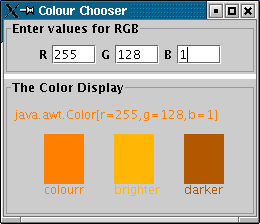
Figure 2: Result of exacuting code presented in Tables 2 and 3.
Created and maintained by Frans Coenen. Last updated 23 August 2005