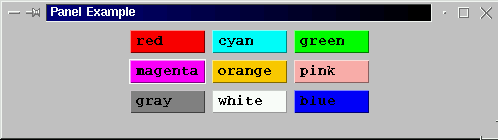
Figure 1 Result of exacuting code presented in Table 1.
|
| 1. Introduction | |
| 2. Panels |
In earlier work we introduced two kinds of container: frames and windows. Here we consider various other sorts of containers start with panels
A Panel is a class of container that is itself contained within a container. A panel is usefull for grouping together components of various kinds. In the example given in Table 1 we have taken the flow layout manager example given earlier and placed the buttons into a panel.
// PANEL LAYOUT  EXAMPLE
// Frans Coenen
// Monday 1 April 2000
// Dept. of Comp. Sci., University of Liverpool

import java.awt.event.*;
import java.awt.*;

class panelEx extends Frame implements WindowListener {

    // --------------------- FIELDS --------------------

    Button button1 = new Button("red    ");
    Button button2 = new Button("cyan   ");
    Button button3 = new Button("green  ");
    Button button4 = new Button("magenta");
    Button button5 = new Button("orange ");
    Button button6 = new Button("pink   ");
    Button button7 = new Button("gray   ");
    Button button8 = new Button("white  ");
    Button button9 = new Button("blue   ");

    /* Constructor */

    public Gui(String text) {
        super(text);

	// Set font

	Font mono = new Font("Monospaced",Font.BOLD,14);
        this.setFont(mono);

	// Set up window

	setBackground(Color.lightGray);
	setLayout(new FlowLayout(FlowLayout.CENTER));
	addWindowListener(this);

	// Create panel
	Panel myPanel = new Panel();
	myPanel.setLayout(new FridLayout(3,3,5,5));

	// Add buttons

	button1.setBackground(Color.red);
        mypannel.add(button1);
	button2.setBackground(Color.cyan);
        mypannel.add(button2);
	button3.setBackground(Color.green);
        mypannel.add(button3);
	button4.setBackground(Color.magenta);
        mypannel.add(button4);
	button5.setBackground(Color.orange);
        mypannel.add(button5);
	button6.setBackground(Color.pink);
        mypannel.add(button6);
	button7.setBackground(Color.gray);
        mypannel.add(button7);
	button8.setBackground(Color.white);
        mypannel.add(button8);
	button9.setBackground(Color.blue);
        mypannel.add(button9);
	}

    /* Window Closed */

    public void windowClosed(WindowEvent event) {
        }

    /* Window Deiconified */

    public void windowDeiconified(WindowEvent event) {
        }

    /* Window  Iconified */

    public void windowIconified(WindowEvent event) {
        }

    /* Window Activated */

    public void windowActivated(WindowEvent event) {
        }

    /* Window Deactivated */

    public void windowDeactivated(WindowEvent event) {
        }

    /* Window Opened */

    public void windowOpened(WindowEvent event) {
        }

    /* Window Closing */

    public void windowClosing(WindowEvent event) {
        System.exit(0);
	}
    }

class GuiEx1 {

    /* Main  method */

    public static void main(String[] args) {
        Gui screen = new Gui("GUI Example 1");

	screen.setSize(500,140);
	screen.setVisible(true);
        }
    }
|
Table 1:Flow layout example
The result is as shown in Figure 1.
Figure 1 Result of exacuting code presented in Table 1.
Created and maintained by Frans Coenen. Last updated 04 September 2000